第一章 Java入门
Java特性
- 面向对象
- 平台无关(JVM:Java虚拟机)—— 字节码不是机器指令
环境配置



零散知识
javac 编译,java 解释运行- Java源文件中只能有一个
public 类,文件名必须为 public 类的名字
- 源文件有几个类就有几个
.class 文件
- 一个Java程序必须有一个类含有
public static void main(String args[]) 方法
- 单行注释
//,多行注释 /* */
对象与方法
对象是基于类创建的,对象去做我们想做地事,类中有许多方法
例子:第一个Java程序
1
2
3
4
5
6
7
8
9
10
11
12
| public class hello {
public static void main(String[] args){
student stu = new student();
stu.spr("nihao");
}
}
class student {
public void spr(String s){
System.out.println(s);
}
}
|
第二章 数据类型与数组
基本数据类型
Java字符集是 Unicode。
| 类型 |
说明 |
| byte |
1字节 |
| short |
2字节 |
| int |
4字节 |
| long |
8字节,末尾加 L 或 l |
| float |
4字节,末尾加 F 或 f |
| double |
8字节,默认类型 |
| char |
2字节 |
| boolean |
true / false |
类型转换从低到高:byte → short → char → int → long → float → double
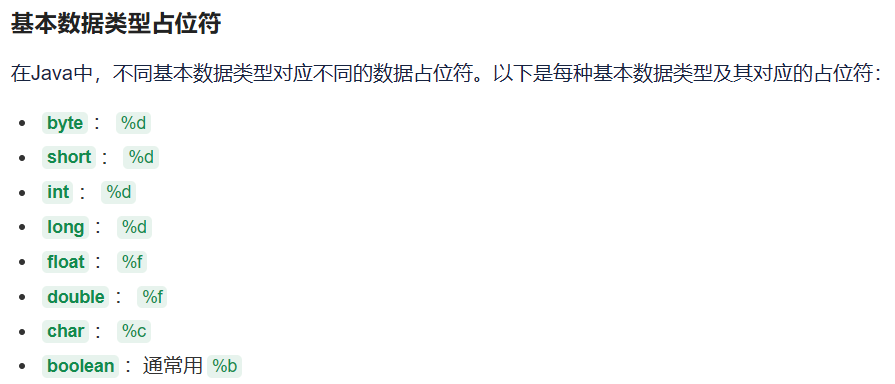
Scanner读取输入
1
2
3
4
5
6
| import java.util.Scanner;
Scanner reader = new Scanner(System.in);
double x = reader.nextDouble();
int n = reader.nextInt();
String str = reader.next();
|
数组
1
2
3
4
5
6
7
8
9
10
11
12
13
|
float a[];
float[] a;
a = new float[4];
float a[] = new float[4];
a.length
a[2].length
|
例子:数组赋值与引用
1
2
3
4
5
6
7
8
9
10
11
12
| public class sz{
public static void main(String[] args){
int a[] = new int[3];
int b[] = new int[4];
a[0] = 1; a[1] = 3; a[2] = 3;
b[0] = 1; b[1] = 2; b[2] = 3; b[3] = 4;
a = b;
for(int i = 0; i < 4; i++){
System.out.println(a[i]);
}
}
}
|
第三章 流程控制
顺序结构
程序从上到下依次执行。
选择结构
循环结构
while 循环do-while 循环for 循环- 增强for循环:
for(类型 变量 : 数组)
注意事项
1
2
3
4
| x = 0;
if((x = 10) == 10 || (y = 20) == 20){
}
|
第四章 类与对象
类的定义
1
2
3
4
5
6
7
8
9
10
11
12
13
14
15
| class 类名 {
int x, y;
类名(int a, int b) {
x = a;
y = b;
}
int add(int a, int b) {
return a + b;
}
}
|
成员变量 vs 局部变量
|
成员变量 |
局部变量 |
| 位置 |
类中,方法外 |
方法内 |
| 声明顺序 |
无所谓 |
有先后 |
| 初始值 |
有默认值 |
无默认值 |
| 作用范围 |
整个类 |
所在方法块 |
构造方法
对象的创建与使用
1
2
3
| 类名 对象名 = new 构造方法();
对象名.方法();
对象名.变量;
|
this关键字
在方法中引用被隐藏的成员变量。
1
2
3
4
5
6
7
| class Point {
int x, y;
Point(int x, int y) {
this.x = x;
this.y = y;
}
}
|
例子:类与对象
1
2
3
4
5
6
7
8
9
10
11
12
13
14
15
16
| class Qiu {
int x, y, z;
Qiu(int a) {
x = a;
}
}
public class es {
public static void main(String[] args){
Xiyou sun;
sun = new Xiyou();
sun.y = 10;
System.out.println(sun.x);
System.out.println(sun.y);
}
}
|
第五章 参数传值
引用类型与值类型
- 值类型:传递的是值的副本
- 引用类型:传递的是对象引用的副本,但指向同一个对象
可变参数
1
2
3
4
5
6
7
| public int getSum(int... x) {
int sum = 0;
for(int i = 0; i < x.length; i++) {
sum += x[i];
}
return sum;
}
|
对象的组合(黑盒引用)
一个类可以把对象作为自己的成员变量。
关系
- 关联关系:通过成员变量建立
- 依赖关系:通过方法参数建立
例子:对象组合
1
2
3
4
5
6
7
8
9
10
11
12
13
14
15
16
17
18
19
20
21
22
23
24
25
26
27
28
29
30
31
32
33
34
35
36
37
38
| class Cube {
Area mj;
void setMj(Area c) {
mj = c;
}
void set(int x) {
mj.set(x);
}
int solve() {
int sideArea = mj.solve();
return sideArea * mj.a;
}
}
class Area {
int a = -1;
void set(int x) {
a = x;
}
int solve() {
if (a == -1) {
return 0;
} else {
return a * a;
}
}
}
public class Ex {
public static void main(String[] args){
Cube m = new Cube();
Area area = new Area();
m.setMj(area);
m.set(4);
int x = m.solve();
System.out.println(x);
}
}
|
第六章 类的成员
类变量(静态变量)
使用 static 关键字修饰,属于类本身,所有实例共享。
1
2
3
4
| class Person {
static int count;
int age;
}
|
类方法(静态方法)
- 只能操作类变量
- 可以通过类名直接调用
this 不能出现在类方法中
1
2
3
| public static int add(int a, int b) {
return a + b;
}
|
方法重载
同一个类中,方法名相同,参数列表不同(个数或类型),与返回值无关。
访问权限
| 修饰符 |
本类 |
本包 |
子类 |
其他包 |
| public |
✓ |
✓ |
✓ |
✓ |
| protected |
✓ |
✓ |
✓ |
✗ |
| default |
✓ |
✓ |
✗ |
✗ |
| private |
✓ |
✗ |
✗ |
✗ |
包
1
2
| import java.util.Scanner;
import java.util.*;
|
第七章 继承
继承语法
1
2
| class 子类名 extends 父类名 {
}
|
- 根节点是
Object 类
- 同一包中:继承除
private 外的所有成员
- 不同包中:继承
protected、public 成员
构造方法与继承
子类初始化时,先调用父类的构造方法(默认调用无参构造,或使用 super())。
成员变量的隐藏
子类成员变量与父类同名时,父类变量被隐藏。使用 super.变量名 访问父类变量。
1
2
3
4
5
6
7
8
9
10
11
12
| class Parent {
int variable = 10;
}
class Child extends Parent {
int variable = 20;
public void printBothVariables() {
System.out.println("父类变量: " + super.variable);
System.out.println("子类变量: " + this.variable);
}
}
|
方法重写
- 方法名、参数列表、返回值类型必须相同
- 不能降低访问权限,可以提高
1
2
3
4
5
6
7
8
9
10
11
12
| class A {
float computer(float x, float y) {
return x + y;
}
}
class B extends A {
@Override
float computer(float x, float y) {
return x * y;
}
}
|
instanceof
判断对象是否为某个类的实例。
1
2
3
| if (obj instanceof String) {
}
|
final
final 类:不能被继承final 方法:不能被重写final 变量:变成常量
1
2
3
| final class A {
final int MAX = 100;
}
|
上转型对象
将子类对象赋值给父类类型的变量。
1
2
3
| Parent p = new Child();
p.parentMethod();
|
abstract(抽象类)
- 抽象类可以没有抽象方法,但有抽象方法的类必须是抽象类
- 抽象方法只有声明,没有实现
- 抽象类不能直接实例化
1
2
3
4
| abstract class Bank {
int money;
public abstract void output();
}
|
例子:继承与多态
1
2
3
4
5
6
7
8
9
10
11
12
13
14
15
16
17
18
19
20
21
22
23
24
25
26
27
28
29
30
31
32
33
34
35
36
37
| class People {
int age, leg = 2, hand = 2;
protected void showPeoleMess() {
System.out.printf("%d岁,%d只腿,%d只手\t", age, leg, hand);
}
}
class Student extends People {
int number;
void tellNumber() {
System.out.printf("学号:%d\t", number);
}
int add(int x, int y) {
return x + y;
}
}
class UniverStudent extends Student {
int multi(int x, int y) {
return x * y;
}
}
public class Example5_1 {
public static void main(String[] args) {
Student zhang = new Student();
zhang.age = 17;
zhang.number = 100101;
zhang.showPeoleMess();
zhang.tellNumber();
System.out.println(zhang.add(9, 29));
UniverStudent geng = new UniverStudent();
geng.age = 21;
System.out.println(geng.multi(9, 29));
}
}
|
例子:成员变量隐藏
1
2
3
4
5
6
7
8
9
10
11
12
13
14
15
16
17
18
19
| class Goods {
public double weight;
public void oldSetWeight(double w) {
weight = w;
}
public double oldGetPrice() {
return weight * 10;
}
}
class CheapGoods extends Goods {
public int weight;
public void newSetWeight(int w) {
weight = w;
}
public double newGetPrice() {
return weight * 10;
}
}
|
第八章 接口与内部类
接口
Java 不支持多重继承,但可以通过接口实现。
接口实现
1
2
| class 类名 implements 接口A, 接口B {
}
|
Lambda表达式
函数式接口可以使用 Lambda 表达式简化。
1
2
3
| (a, b) -> {
return a + b;
}
|
内部类
- 内部类的类体中不可以声明类变量和类方法
- 内部类可以访问外部类的所有成员
匿名内部类
1
2
3
4
5
6
7
8
9
10
11
12
13
14
15
16
17
18
| abstract class Bank {
int money;
public Bank(int money) {
this.money = money;
}
public abstract void output();
}
public class Niming {
public static void main(String[] args) {
new Bank(200) {
public void output() {
money += 100;
System.out.println("资金:" + money);
}
}.output();
}
}
|
第九章 图形用户界面
Swing组件
1
2
3
4
5
6
7
| import javax.swing.*;
import java.awt.*;
JFrame frame = new JFrame("标题");
frame.setSize(400, 300);
frame.setLocation(100, 100);
frame.setVisible(true);
|
常用方法
setBounds(x, y, width, height):设置位置和大小setSize(width, height):设置大小setLocation(x, y):设置位置setVisible(true/false):显示/隐藏setResizable(true/false):是否可调整大小dispose():释放资源